SentinelScan: A Practical Security Workbench for Homelabs and Small IT Teams
If you self-host services, expose a few apps to the internet, or manage a handful of customer environments, you already know the problem: security checks are easy to start, but hard to organize.
One tool scans ports. Another probes websites. Another checks TLS. Another hunts for exposed Docker services. Then you still need a place to review findings, rerun checks, compare runs, and remember what you configured last week.
That is exactly why I built SentinelScan.
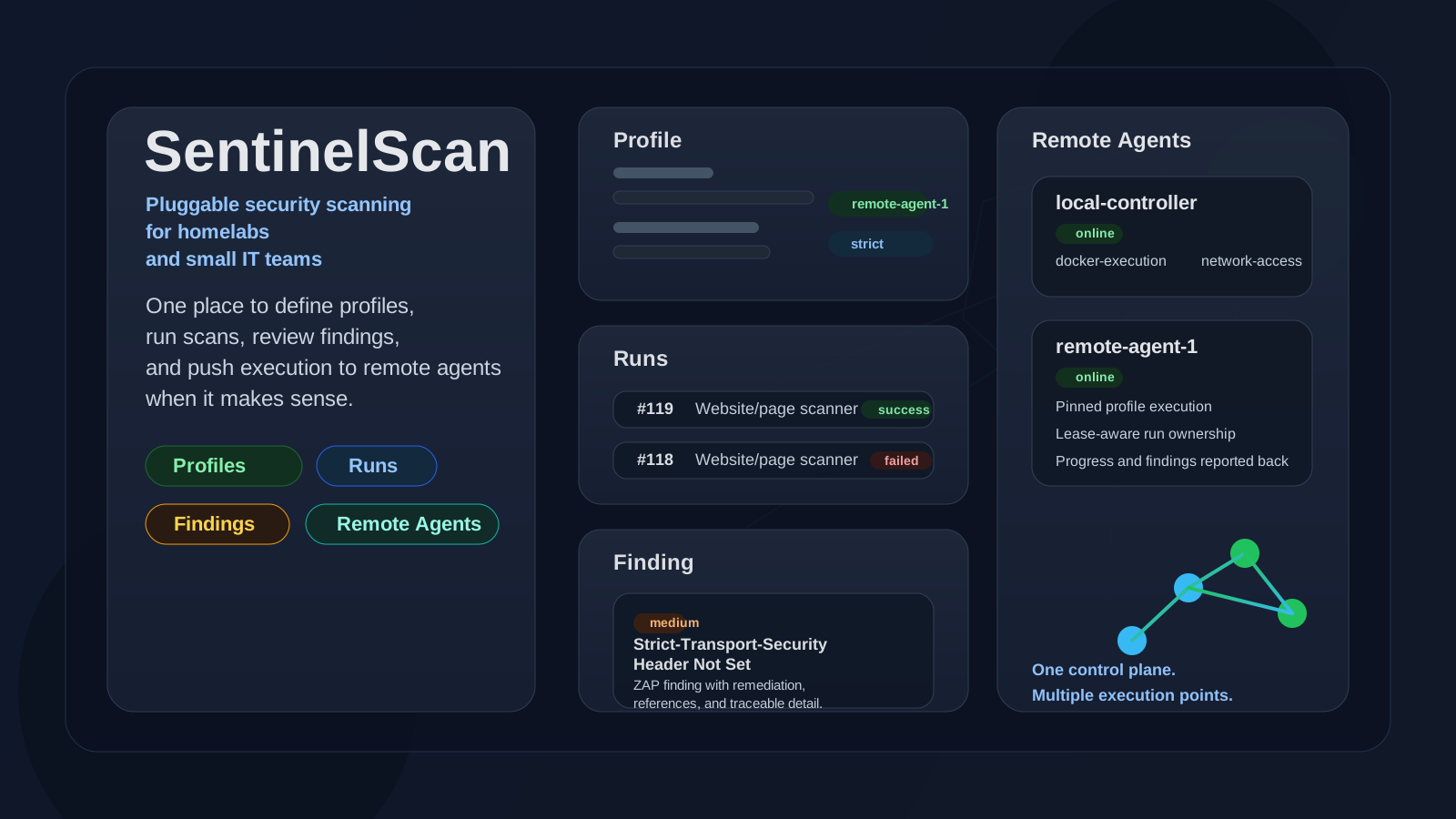
SentinelScan is a self-hosted security scanning workbench designed to make practical security checks easier to run, easier to understand, and much easier to repeat. It is especially useful for:
- homelabbers running public or semi-public services
- self-hosters who want more visibility without building a pile of scripts
- small IT companies that need a lightweight operational security tool without enterprise overhead
It is not trying to replace every specialist security product on the market. It is trying to solve a more practical problem:
make useful, repeatable, multi-tool security checks simple enough to run regularly.
Why I Built It
I spend a lot of time around self-hosted systems, small infrastructure stacks, and real-world operational constraints. In that world, security tooling often falls into two extremes:
- very powerful CLI tools that are great once you already know exactly what you are doing
- large platforms that are too heavy, too expensive, or too enterprise-shaped for smaller environments
There is a big gap in the middle.
SentinelScan is built for that middle.
It gives you one place to:
- define scan profiles
- select the checks you want
- configure targets
- run scans on demand or on a schedule
- review findings, logs, and progress in one UI
And most importantly, it stays practical.
What SentinelScan Actually Does
At a high level, SentinelScan lets you combine multiple kinds of checks into one repeatable workflow.
That includes:
- network discovery
- HTTP probing
- web content discovery
- web vulnerability checks
- TLS and certificate checks
- Docker exposure checks
- database and SMB exposure checks
- subdomain and takeover checks
- Docker image scanning with Trivy
Instead of running those individually and stitching the outputs together yourself, you build a profile once and run it whenever you need it.
The Real Advantage: It’s Pluggable
This is the part I care about most.
SentinelScan is not a single-purpose scanner. It is a pluggable scanning platform.
That means:
- new tools can be added without redesigning the whole product
- existing tools can expose configurable options through the UI
- you can mix bundled tools with BYO tools where licensing or packaging makes that the safer choice
- the same product can fit very different environments
That flexibility matters because real environments are messy.
A homelab might care about:
- port exposure
- TLS issues
- Docker sockets
- public web surfaces
A small IT company might care about:
- repeatable website checks for multiple customers
- quick attack-surface visibility
- agent-based execution in different places
- an easy way to review findings without dumping raw CLI output into chat
The pluggable design makes both use cases realistic.
It’s Built to Be Easy to Use
I wanted this to feel like a tool you can actually live with.
You create a profile, define targets, pick components, adjust settings where needed, and run it.
No giant YAML maze.
No juggling eight terminals.
No remembering which output file ended up where.
You can see that in the profile workflow:
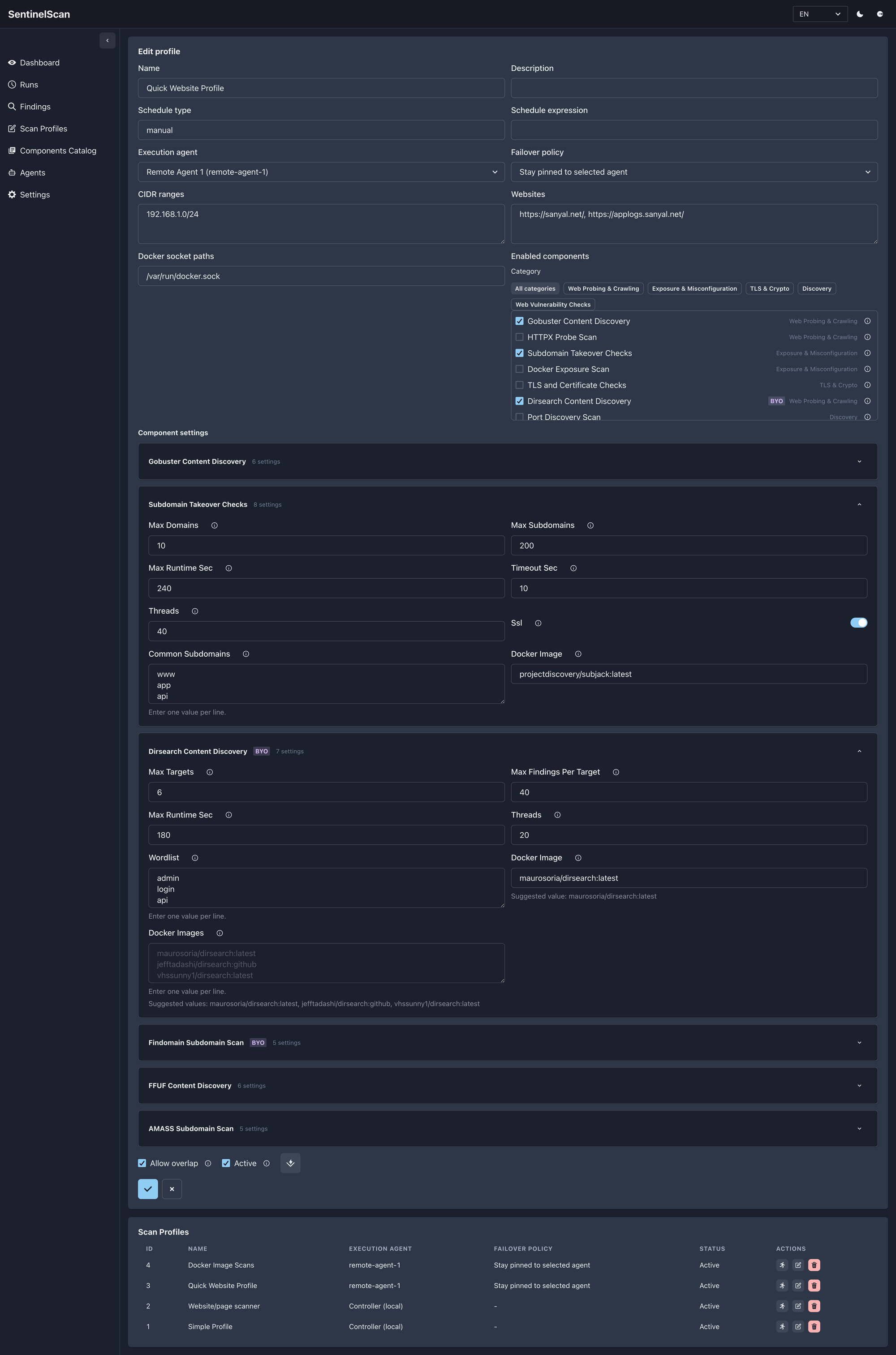
The UI keeps the workflow clear:
- profiles define the intent
- component settings stay collapsible so the page does not become overwhelming
- BYO-only tools are clearly marked
- missing configuration is flagged before you run anything
That last point matters more than it sounds. Silent failure is one of the worst traits in operational security tooling. If a tool needs your own Docker image, the UI should make that obvious.
The Runs View Is Where It Becomes Operational
Security tooling gets much more useful when it helps you answer:
- what ran?
- what failed?
- what is still running?
- which profile produced which result?
That is where the Runs view earns its keep.
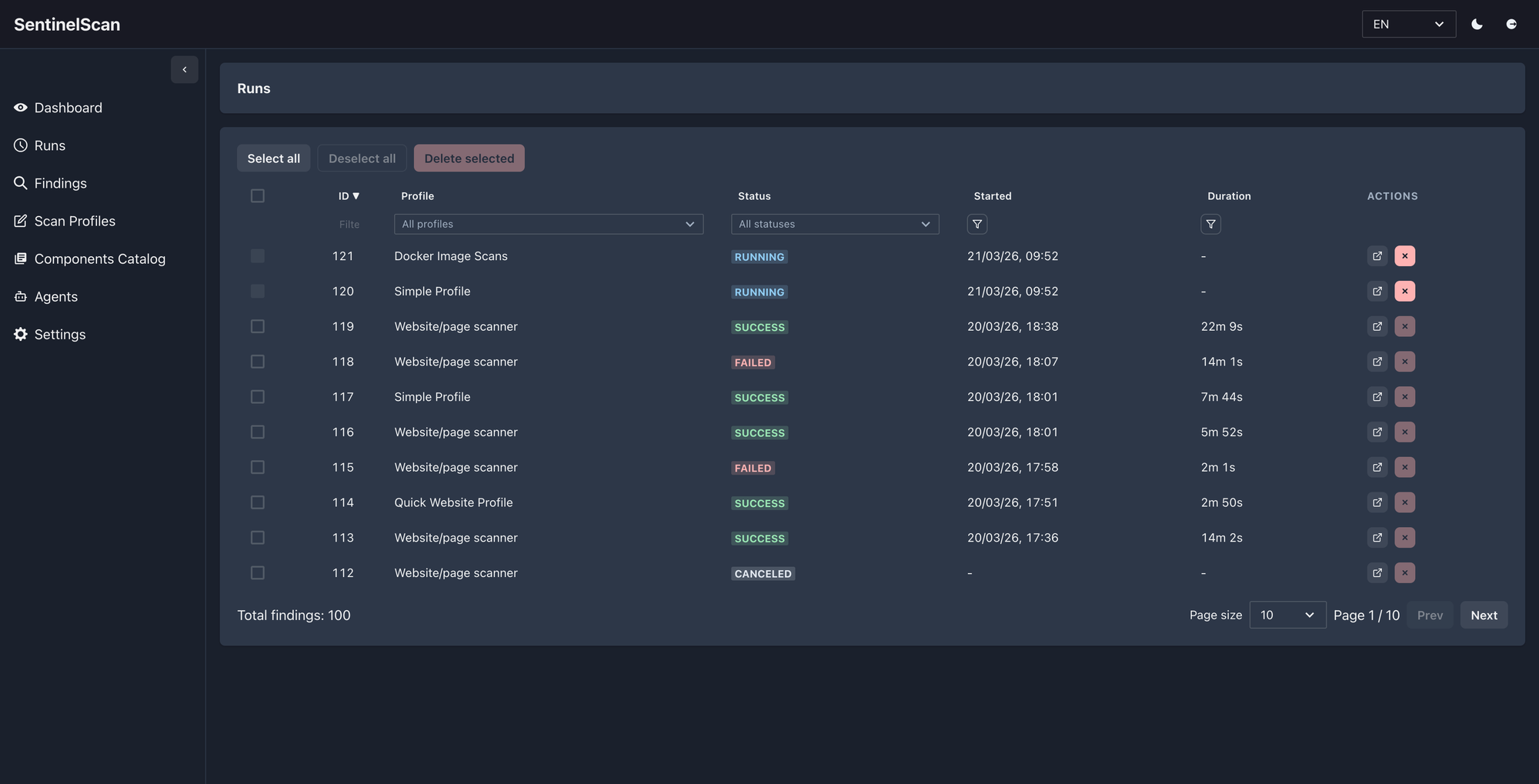
Instead of just showing a pile of raw execution history, SentinelScan gives you a simple operational view with:
- run status
- profile context
- duration
- direct links into run details
- easy filtering when you are looking for one specific execution
For a homelab, that means less guesswork.
For a small IT team, it means you can actually trace activity without opening a dozen terminal windows or log files.
Run Details Make Troubleshooting Far Less Painful
This is one of the parts I care about most.
A scanner is not useful if you cannot tell what happened when something goes wrong.
Run details are designed to answer that clearly:
- overall progress
- per-component status
- heartbeat updates
- last activity
- exportable JSON results
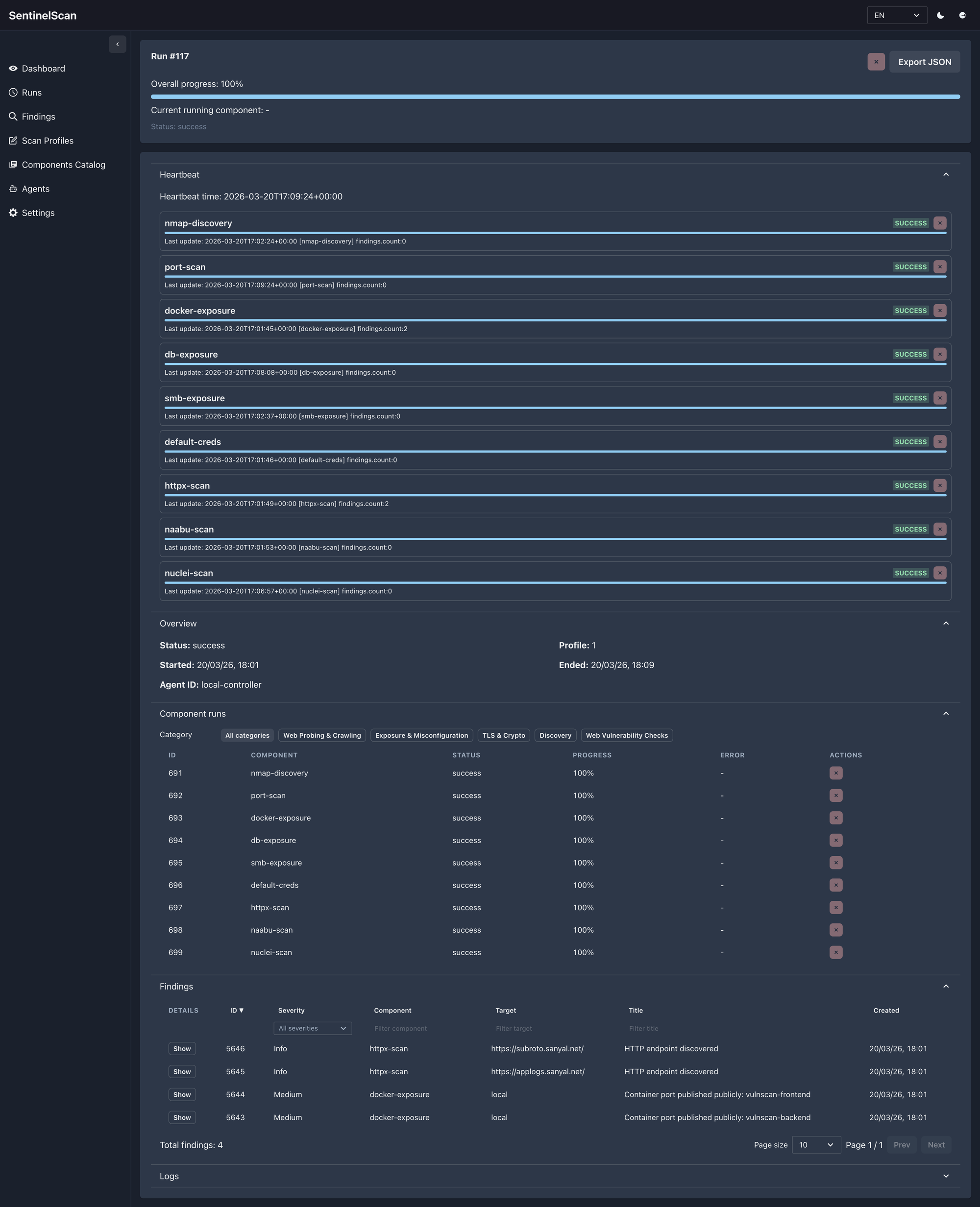
That is especially important when you are running multiple checks at once across very different targets.
Some checks finish quickly.
Some take longer.
Some surface real issues.
Some tell you a tool was unavailable or misconfigured.
The goal is not to hide that complexity. The goal is to make it understandable.
Findings Stay Reviewable Instead of Becoming Noise
A lot of tools can generate findings.
Far fewer tools make those findings easy to work through.
SentinelScan keeps the Findings view filterable and navigable so you can move from “something was found” to “what do I need to care about first?” without fighting the interface.
You can also expand an individual finding inline to inspect the problem statement, remediation, references, and trace data without leaving the page.
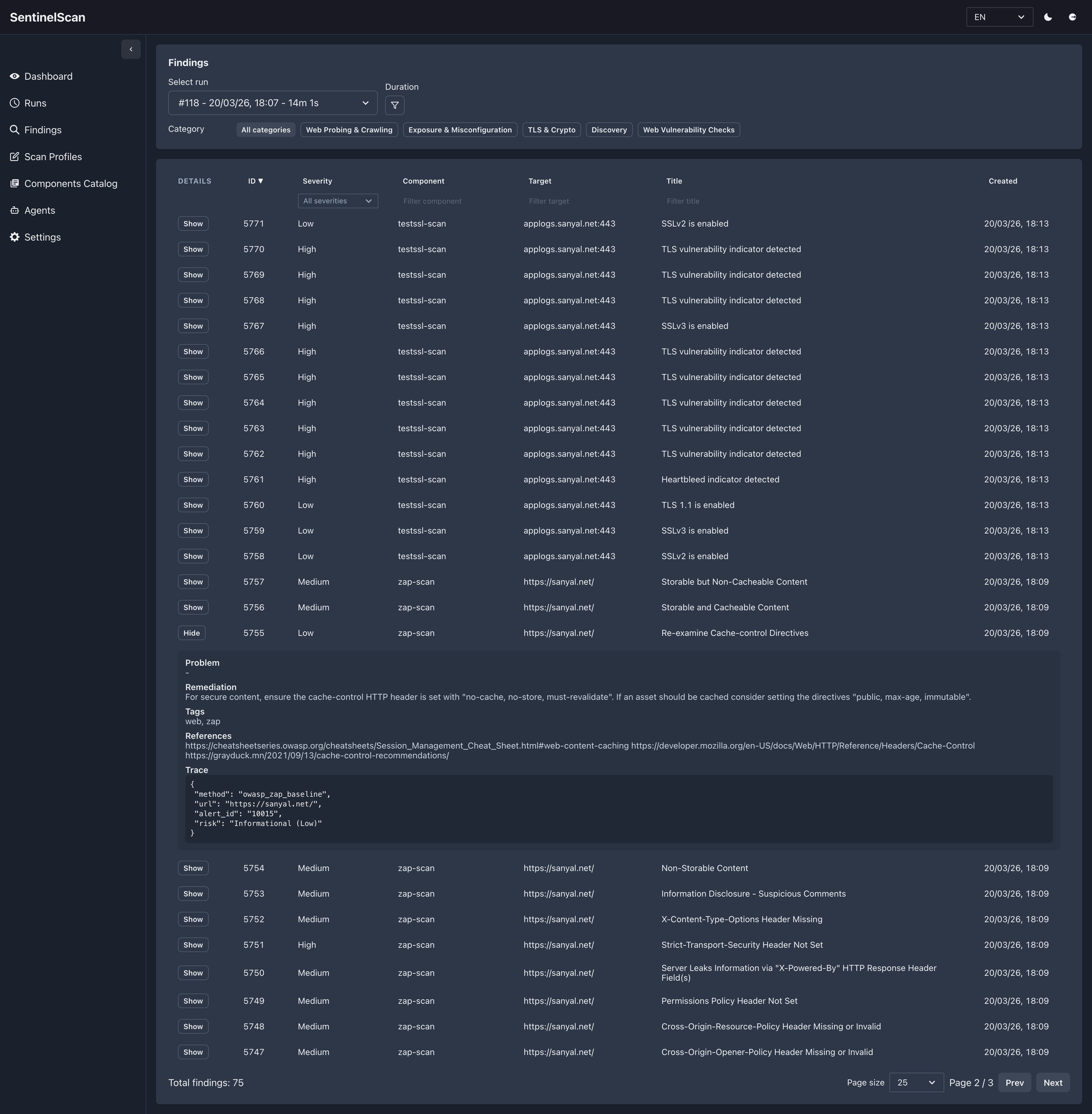
That matters for both of the audiences I built this for:
- homelabbers who want clear visibility without drowning in output
- small IT companies who need something practical enough to review regularly
The point is not just to collect findings.
The point is to make them usable.
Remote Agents Make It More Flexible Than a Single-Box Scanner
This is one of the most practical features in SentinelScan.
Not every environment should be scanned from one machine.
Sometimes you want the controller and the scanner to live in different places:
- a homelab where one small box coordinates scans while another machine does the heavier lifting
- a small IT company that wants to keep one control plane but run checks closer to different customer or office environments
- a setup where you want to separate orchestration from execution without making the workflow painful
That is where the remote agent model becomes useful.
You still work from one UI.
You still create profiles the same way.
But execution can be delegated to an agent that is registered, visible, and manageable from the product.
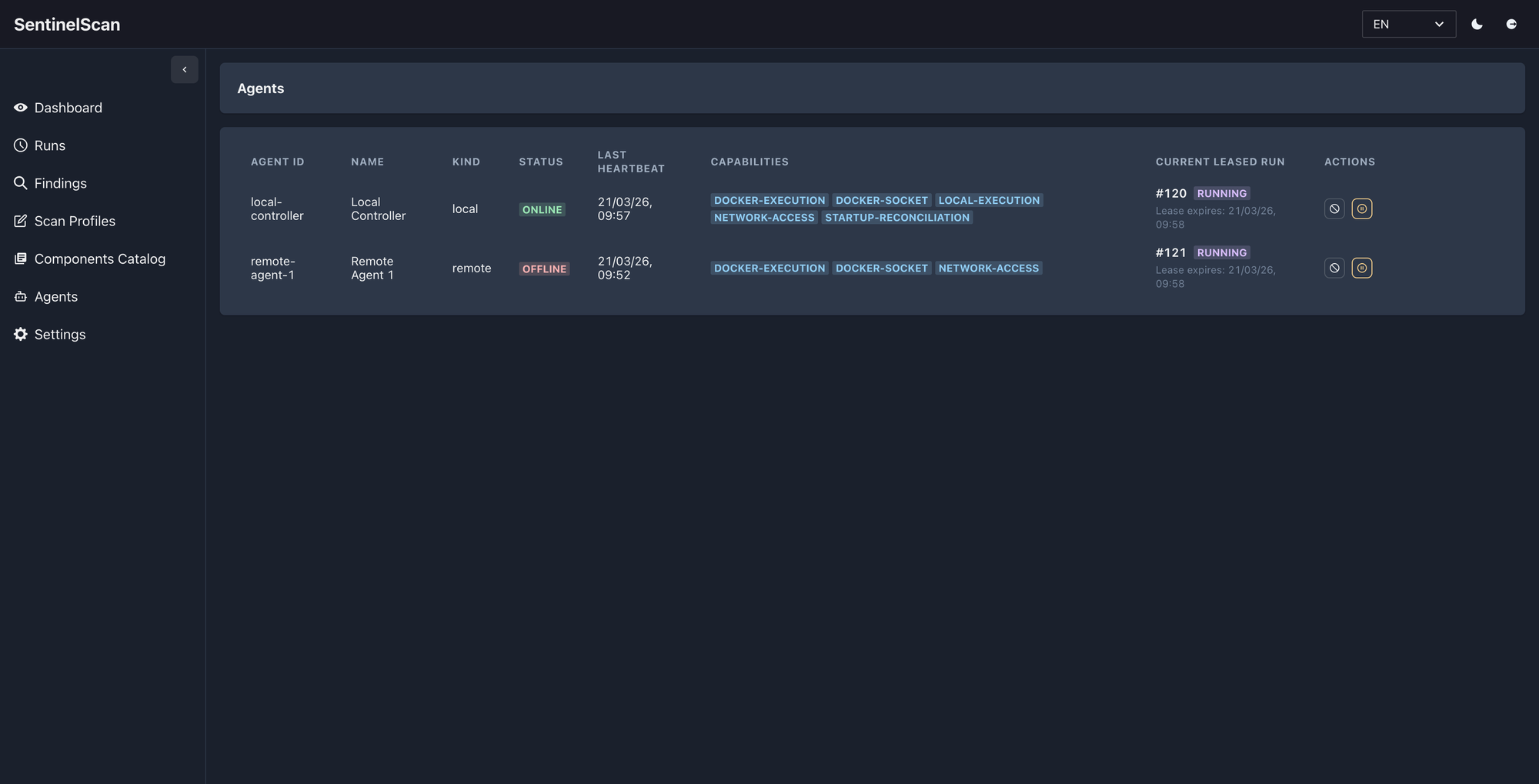
That gives you a few real advantages:
- you can keep scanning capacity away from the controller
- you can run checks in the place that makes the most sense
- you can pin specific profiles to a specific agent when needed
- you do not lose the operational visibility that usually disappears when tooling gets distributed
For homelabbers, that can simply mean running scans from the right machine without turning everything into SSH scripts.
For small IT teams, it means one product can coordinate work across multiple execution points without becoming a heavyweight enterprise system.
Why This Works Well for Homelabs
Homelabs are often more complex than people admit.
Even a “small” setup can include:
- reverse proxies
- public DNS
- multiple websites
- containerized workloads
- remote access services
- databases and dashboards
- experiments that accidentally become permanent
That environment benefits from a tool that is:
- self-hosted
- practical
- not overloaded with enterprise ceremony
- flexible enough to scan both websites and infrastructure surfaces
SentinelScan fits that shape well.
It gives homelabbers a way to go from:
“I should probably check this again sometime”
to:
“I already have a profile for that.”
Why Small IT Companies Can Get Value from It Too
Small IT teams usually do not need a giant security platform on day one.
What they often need is:
- repeatable checks
- multiple target profiles
- clear results
- enough versatility to cover websites, infrastructure, TLS, and Docker-based services
- something teammates can actually operate without deep specialist knowledge
SentinelScan is a good fit there because it lowers the operational cost of doing the basics well.
It is especially useful if you:
- manage websites and small customer environments
- need lightweight security visibility without a full SOC-shaped stack
- want something self-hosted and understandable
A Quick Note on Versatility
SentinelScan is intentionally broad without being vague.
It can operate as:
- a quick website scanner
- a homelab visibility tool
- a repeatable security checklist engine
- an agent-capable scanner for distributed environments
That versatility is what makes it interesting to me.
It is not locked into one narrow mode of use.
What’s Next
I’m still actively improving it.
That means:
- refining tool integrations
- making failure states clearer
- improving UX
- expanding the component catalog
- tightening the experience for real-world operators
If there is a feature that would make it more useful in your environment, I’m happy to discuss it and happy to add more where it makes sense.
If you want to talk more about the product, the thinking behind it, or how it could fit your setup, you can find me here:
Final Thought
SentinelScan is built for people who want practical security checks without unnecessary friction.
If you run a homelab, self-host your own services, or operate a small IT environment, this is the kind of tool that can save you time while making your security posture easier to understand.
It is not about replacing judgment.
It is about making good operational judgment easier to apply consistently.
If you're running a homelab or a small IT environment and want something practical, pluggable, and self-hosted, let’s talk.
Get in touch