I Built an AI That Replies to My WhatsApp, and Taught It to Ask Permission First
A self-hosted agent that drafts WhatsApp replies in my voice. Every chat starts OFF, trust is earned per chat, and the bot always says when it's the bot.
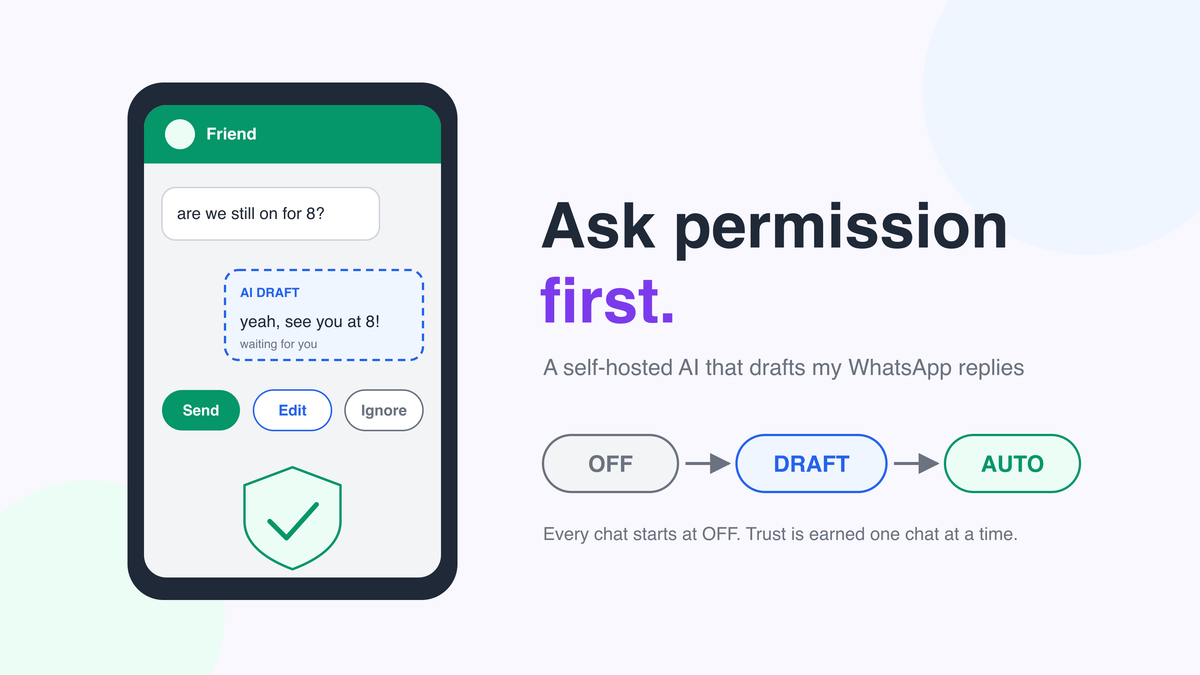
• I built a self-hosted agent that reads my personal WhatsApp and drafts replies in my own voice.
• Every chat starts at OFF. I move a chat up to DRAFT (AI writes, I decide) and only later to AUTO (AI may send on its own).
• Even in AUTO, a risk gate holds anything about money, passwords, legal, medical or job matters. Real auto-sends carry a visible bot prefix.
• For chats where I switch on "playful mode", it can suggest a meme or a Hindi film line, always waiting for my tap.
• It runs in one Docker container at home. Message text goes only to the AI model I configure, and that can be a fully local one.
The problem: 47 unread chats and a guilty conscience
You know the feeling. You open WhatsApp after a long day and there's a wall of green badges. A friend asking if dinner is still on. A cousin's voice note. A group chat where someone, somewhere, has asked you a direct question.
Most of these replies are tiny: "yes, 8 works", "haha", "send me the link". They pile up, and some get forgotten. I wanted help with the small ones, without handing my social life to a bot that might say something stupid in my name.
So I set myself one rule before writing any code: the AI has to ask permission first. It can earn more freedom later, one chat at a time, but it never starts with any.
What I built
The WhatsApp AI Reply Agent is a small app that runs on my own machine. It links to my personal WhatsApp account the same way WhatsApp Web does, as a "linked device". It watches incoming messages, writes draft replies that sound like me, and shows them on a phone-friendly dashboard where I can send, edit, ignore or regenerate them. For a few chats I trust it with, it can send on its own, but only after passing a set of safety checks.
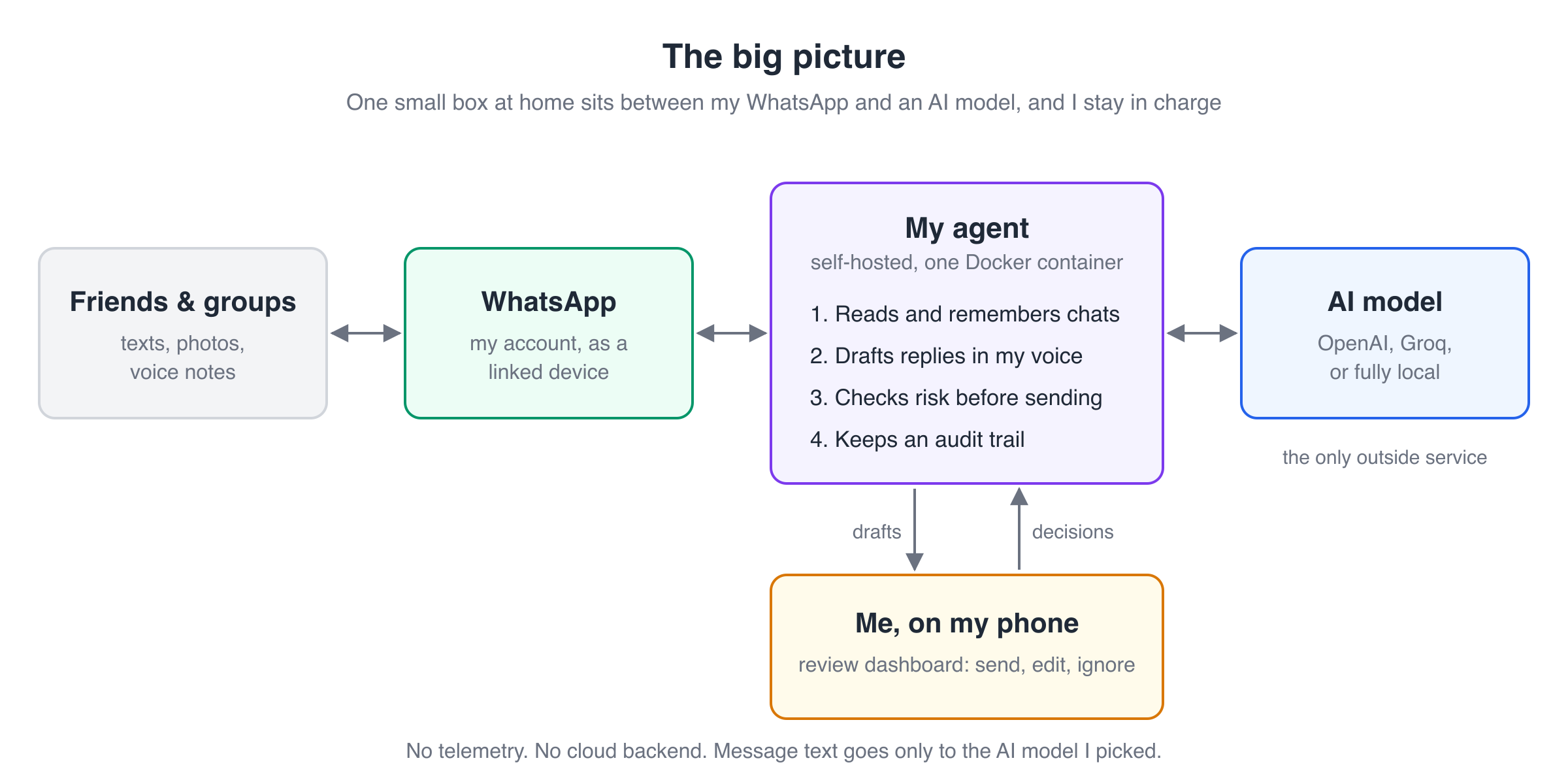
Think of a new assistant on their first day: they can suggest replies, but they don't sign anything until you trust their work.
The trust ladder: OFF, DRAFT, AUTO
The heart of the project is a single setting per chat, called its mode. There are four of them:
| Mode | What happens |
|---|---|
| OFF | Messages are stored, nothing is drafted. Every new chat starts here. |
| DRAFT | The AI writes a reply and waits. I send it, edit it, ignore it or ask for another. |
| AUTO | The AI writes a reply and may send it itself, if it passes the risk gate. If not, it falls back to a normal draft. |
| PAUSED | A per-chat kill switch: still observing, never drafting. |
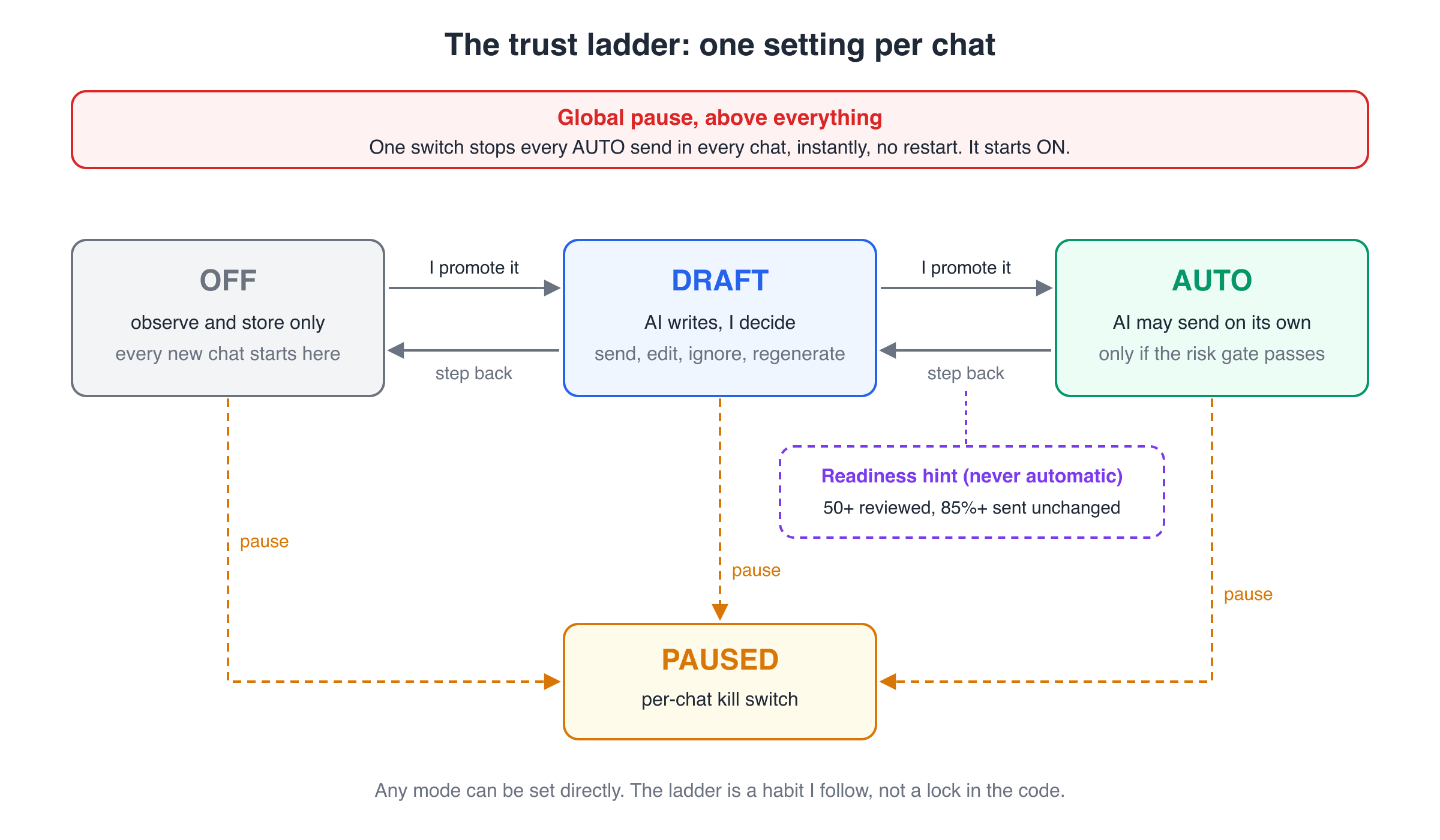
Above all of these sits a global pause. One switch stops every auto-send in every chat at once. On a fresh install it starts on, so nothing auto-sends until I deliberately turn it off.
How do I know when a chat is ready for AUTO? The dashboard tracks how often I send a draft unchanged, edit it, or throw it away. After at least 50 reviewed drafts with 85% or more sent unchanged, it shows a "ready for AUTO" hint. Only a hint: nothing ever flips a chat to AUTO by itself.
How it works under the hood
Here's the path a message takes, from my phone to a draft and sometimes back out.
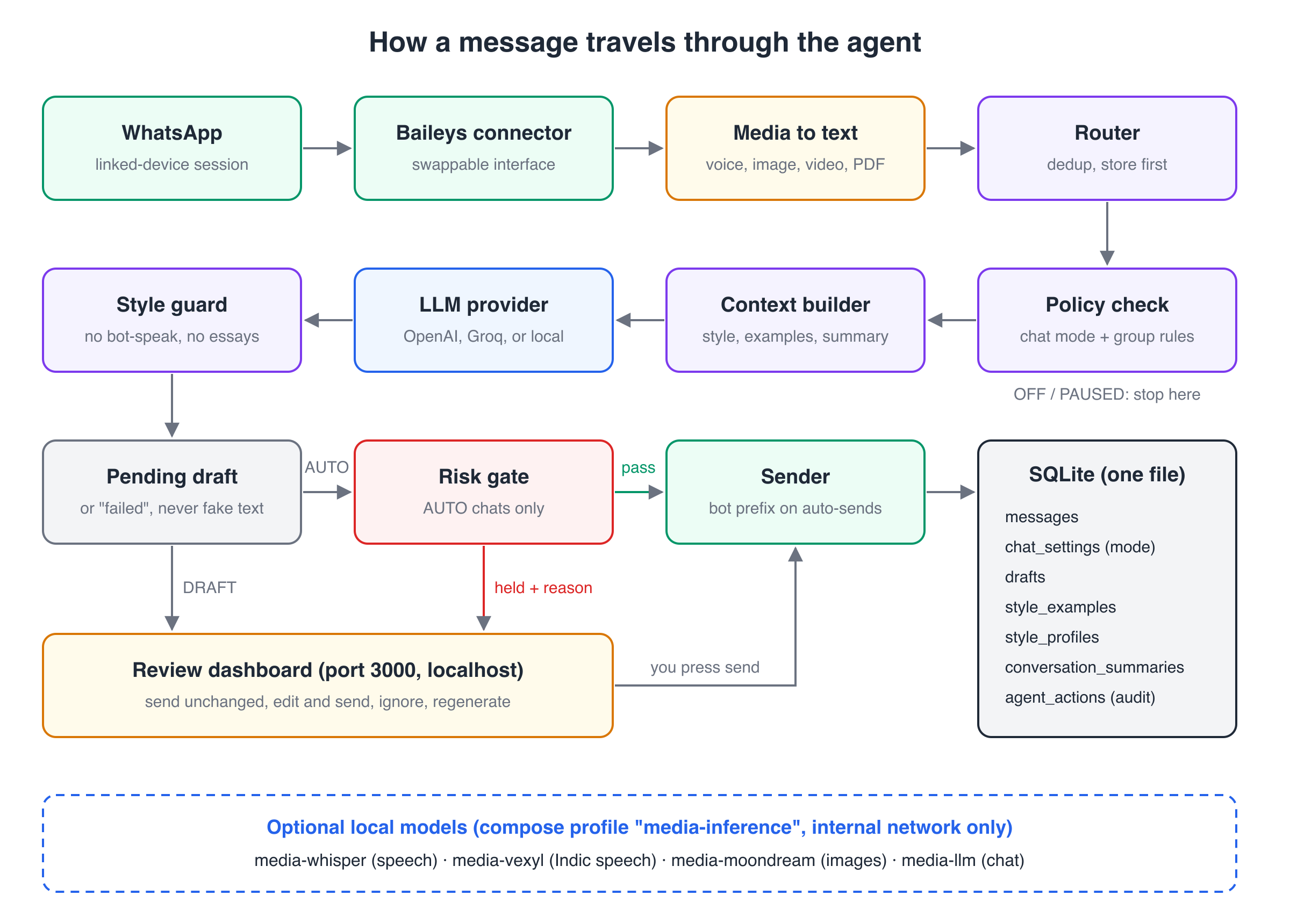
1. The connector: a doorway that can be replaced
The app talks to WhatsApp through Baileys, an open-source library that speaks the same protocol as WhatsApp Web. It's event-driven, so there's no headless browser and no polling. I scan a QR code once, and the session is saved to a Docker volume so restarts don't need a new scan.
This is the riskiest part. It's an unofficial protocol, not the WhatsApp Business API, and WhatsApp can change it at any time. So the connector sits behind a small interface: if it breaks, I swap the doorway without touching the house.
2. Media to text: photos and voice notes become words
A lot of real WhatsApp traffic isn't text. Before a message reaches the rest of the pipeline, the connector turns it into plain text with a little label:
- Voice notes are transcribed with Whisper and become
[voice message] are we still on for 8? - Images are described by a vision model, keeping any caption.
- Videos use the small thumbnail WhatsApp already embeds, so there's no big download.
- PDFs have their text pulled out.
If anything fails, the message becomes a placeholder like [voice message received — could not transcribe], never silently dropped. Raw audio isn't kept; only the text survives.
Since I chat in English, Hindi and Bengali, voice notes from a chat that is mostly in an Indic script can go to a separate Indic speech model (IndicConformer) instead of Whisper, which often wrote Bengali audio in the wrong script.
3. Router and policy: should we even bother?
The router saves every message to SQLite first, and skips duplicates (reconnects can replay old messages). Then it checks the chat's mode. OFF or PAUSED? Stop here.
Groups get one more filter. A busy family group can produce hundreds of messages a day, and most have nothing to do with me. So by default, a group in DRAFT or AUTO only drafts when I'm @mentioned. I can also switch on "someone replied to my message" or "the message contains a question mark", or set the group to "always". Ordinary chatter never reaches the AI, which saves money as well as embarrassment.
4. Context builder: teaching it to sound like me
This is where the prompt gets assembled. It includes:
- the last 20 messages of the chat, plus a rolling summary of anything older,
- a short bio about me and an optional note about who this person is ("my sister", "my landlord"), neither of which is ever shown to them,
- a style profile: typical length, capitalisation, emoji habits, language mix,
- real examples of things I've actually written in this chat, sent as example conversation turns.
For one-to-one chats it also searches the history (with SQLite's built-in full-text search) for similar messages and shows the model how I really replied: "last time someone asked this, you said that."
5. The model, then the style guard
The model can be OpenAI, Groq, or a fully local Qwen2.5-7B running in its own container via llama.cpp. They all sit behind the same small interface.
Models love to sound like helpful assistants; I don't. So every draft goes through a style guard: simple rules that reject openers like "Sure!" or "Great question", phrases like "Hope this helps", and essays in reply to one-liners. A reply can be at most 8 words or three times the length of the incoming message, whichever is bigger. If a draft breaks a rule, the app asks the model once more and says exactly what went wrong. It keeps the second try only if it's actually better.
Follow one message from start to finish
Let's trace a real-life case: a friend sends a voice note to a chat I've set to AUTO.
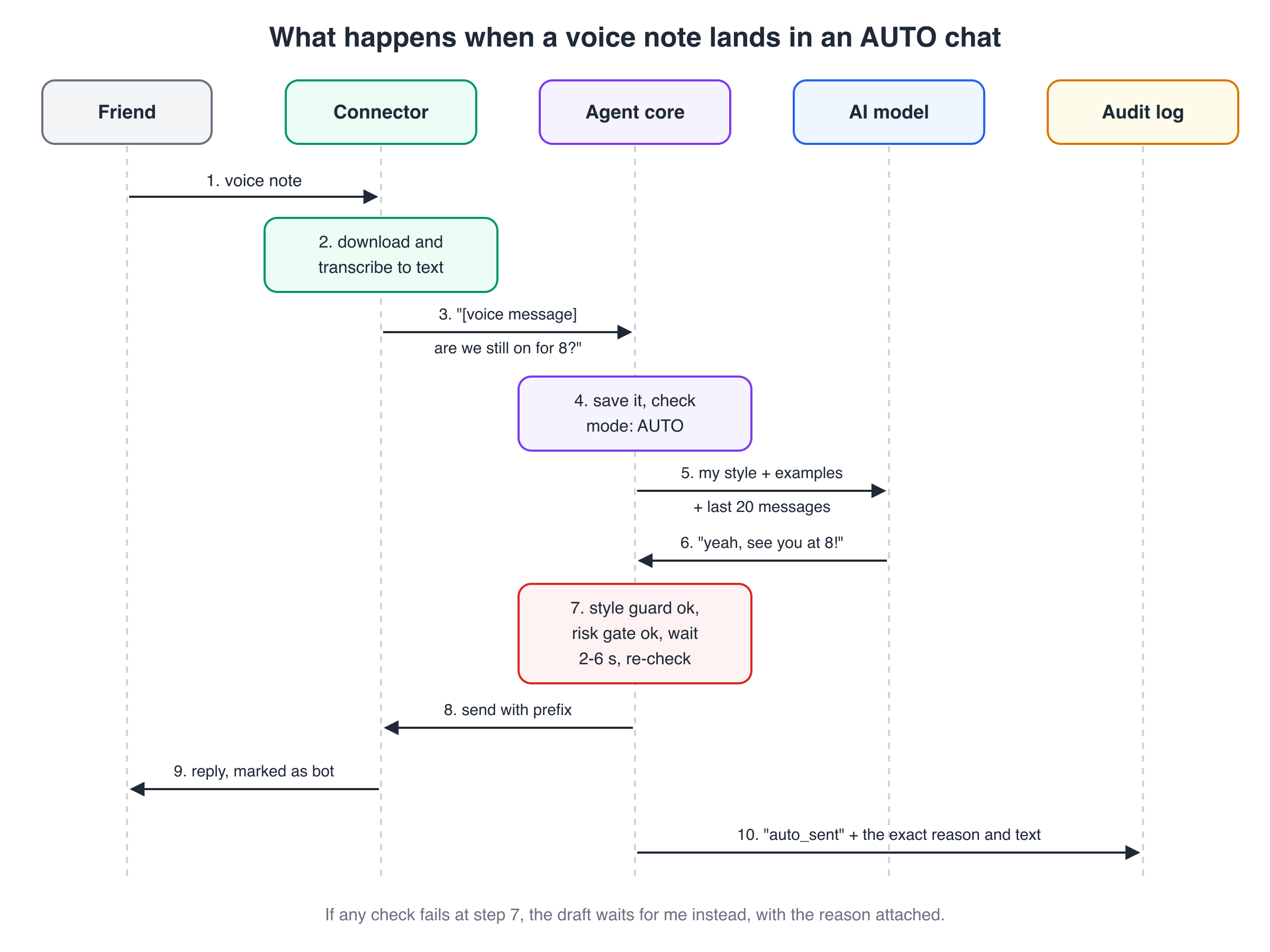
- The voice note arrives at the connector.
- It's downloaded and transcribed.
- The agent gets
[voice message] are we still on for 8? - The message is saved, and the chat's mode is AUTO.
- The context builder sends my style, real examples and recent messages to the model.
- The model answers: "yeah, see you at 8!"
- The style guard is happy. The risk gate checks run (more on that next). Then there's a random wait of 2 to 6 seconds and a second check.
- The reply goes out with a short prefix that marks it as a bot reply.
- My friend sees it, and can tell it was automated.
- An
auto_sentrow lands in the audit log, with the exact text and the reason it was allowed.
If anything goes wrong at step 7, nothing is sent. The draft simply waits for me on the dashboard, with the reason written on it.
Design decisions worth stealing
1. A risk gate made of boring rules, not AI
Before any auto-send, five checks run in order. Any single "yes" holds the draft back.
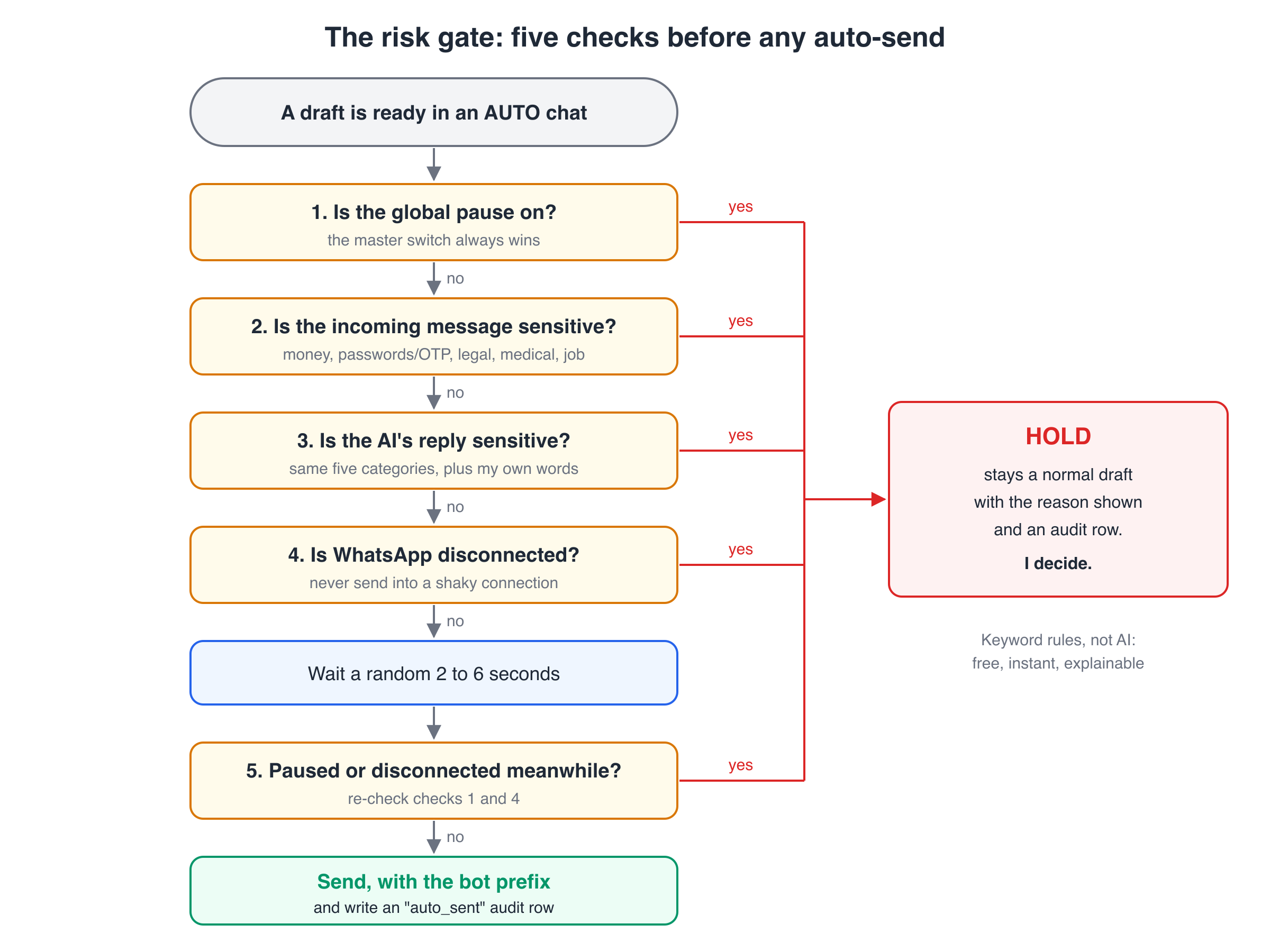
The "sensitive" check covers five categories: financial (card numbers, bank accounts), credentials (passwords, OTPs, PINs), legal (lawsuits, contracts, NDAs), medical emergencies, and employment (firings, resignations). I can add my own words through a setting, without changing code. It checks both the incoming message and the AI's reply, so the AI can't wander into a sensitive topic on its own.
Why rules? I could have asked the model "is this sensitive?", but rules are free, instant, predictable and easy to explain.
The trade-off: keywords miss clever phrasing and flag harmless things (a "wifi password" message got held). That's the right way round: a false alarm costs one tap, a miss could cost far more.
2. Be honest when the bot is talking
This is the ethics part. If my friend thinks they're chatting with me and it's actually a model, that's a small deception, even when the reply is harmless.
So every genuine auto-send starts with a short bot tag. The rule is simple: if a human didn't press send, the other person gets told. Anything I send myself, whether I kept the draft as it was or edited it, goes out clean, because I chose to send it. Disclosure is the app's job, done the same way every time, not left to the model's mood.
One subtle detail: the prefix is added only to the message WhatsApp delivers. The stored copy stays clean, otherwise the tag would leak into future prompts and the model would think it's how I talk.
The trade-off: the prefix makes AUTO replies feel slightly less personal. I think that's the honest price of automation.
3. Learn style per chat, and only from human words
I don't text my mum the way I text my school friends. So style examples are stored per chat, and each chat's prompt only ever sees that chat's examples. A global baseline profile covers the gaps, and each chat can have its own override on top, so nothing leaks from one conversation into another.
The bigger lesson was about which messages count as my style. Things I type on my phone count. Drafts I edited before sending count, using my corrected version. Drafts I sent unchanged don't count, and neither do auto-sends. Those are the AI's words. Feeding them back in would slowly turn "my style" into the model's style, like a photocopy of a photocopy. The similar-message search follows the same rule and skips AI-written replies.
The trade-off: learning is slower. The app back-fills examples from each chat's history, and a style refresh needs at least 5 examples, so one odd message can't skew the profile.
4. Fail loudly, never fake it
If the model times out or returns nothing, the app saves a failed draft with the error. It never sends a fallback like "Sorry, busy right now!" A silent made-up reply would be worse than none at all.
The same goes for the audit trail. Every send, hold and failure is recorded in an agent_actions table with the reason, so for any automated message I can answer "why did this go out?"
127.0.0.1. API keys live only in .env, never in the config file or logs. Message text goes to exactly one outside party, the AI provider I choose, and with the local models even that goes away. Link previews are off by default, because fetching links strangers send you is a real security and privacy risk.Sometimes the best reply is a meme (or a film line)
Some messages don't want words. A friend finally gets the job, or their flight is delayed again, and the perfect answer is a reaction picture or a well-known line from a Hindi film. That's how many of my chats work, so I added an optional "playful mode".
Think of the friend at dinner who knows when a joke will land and, more importantly, when to keep quiet. Most of the time the right move is no joke at all, and the feature is built around that.
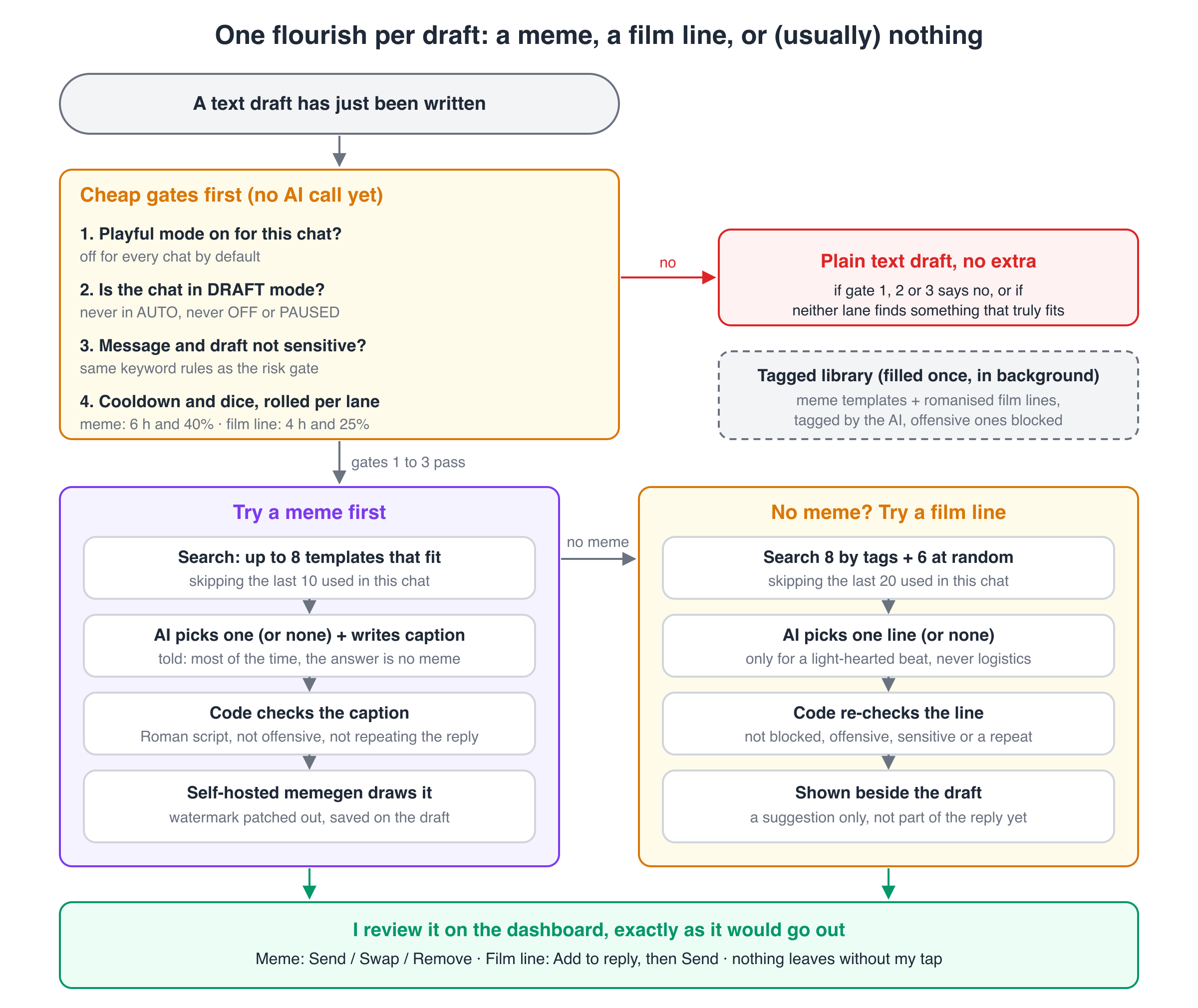
How it works
- Cheap gates first. Playful mode must be on for the chat (it's off by default), the chat must be in DRAFT mode, and neither the message nor the draft may trip the risk gate's sensitive-topic rules. Then a cooldown and a dice roll: a meme is tried on 40% of eligible drafts, at most once per chat every 6 hours. Film lines use 25% and 4 hours.
- A short menu. The app searches a tagged library for up to 8 meme templates matching the conversation and the planned reply, skipping recent ones. Film lines get the same search plus 6 random picks, because the tags are English and my chats are Hinglish.
- The AI picks, or says no. A second small model call sees the last few messages, the draft and the menu. Plans, times, money and anything serious get no meme. For a meme it also writes the caption, which must add a punchline, since my reply goes underneath it.
- Draw it. Memes are drawn by memegen, an open-source caption renderer I run myself. A film line isn't drawn; it appears as a quote card beside the draft.
The library fills itself on first start: memegen's templates, a public research dataset of meme templates, and a public collection of romanised Hindi film lines. The model tags each one in the background, on a token budget so live drafts keep their quota. The film-line dataset has no licence, so it's downloaded for private use and never committed to the repo.
One small fix: the open-source memegen build stamps its website name on every image, and the switch to remove it only works on the author's hosted service. A meme sent to a friend shouldn't carry an ad, so a six-line patch disables the watermark at build time, keeping the MIT licence notice.
The safety rules
- Never in AUTO. Extras only exist on pending drafts in DRAFT chats. A meme is shown exactly as it will go out, and I can swap or remove it. A film line joins the reply only if I tap "Add to reply", then Send.
- Never on sensitive topics. The risk-gate rules check the message, the draft, and the caption or line itself.
- Extra care in groups. The model is told everyone must enjoy it, it must never target one person, and when in doubt, nothing.
- Two blocklists. Word lists block abuse, violence, sexual content, religion, caste, politics and drugs at import, and the tagging model's own safety verdict is a second net.
Worth stealing: the AI chooses, code has the last word
The model never gets a blank page. It picks from a short menu and must answer with a candidate ID or "none". Then plain code checks its work: Roman script only, nothing offensive or sensitive, no assistant-speak, and a caption that mostly repeats my reply is thrown out. A prompt can ask for good taste; only code can guarantee the basics. The trade-off is fewer memes, which is the right side to err on for jokes in my name.
What was hard (and what I learned)
- "Successful" empty replies. One reasoning model used its whole token budget on hidden thinking and returned an empty message, but reported success. Now an empty reply counts as a failure and gets retried. An empty auto-send would have been very odd.
- Drafts stuck forever. The gate ran once per draft, so a draft held by the global pause stayed held after I turned the pause off. A real stuck draft showed me, and now there's a "Retry auto-send" button.
- One person, two chats. WhatsApp sometimes uses two internal IDs for one contact, so the same person appeared twice. The app now merges them, keeping the side I configured.
- The local model was harder than it looked. A 7B model on a CPU crashed on long prompts and on two requests at once, and hit an 8-second timeout hidden in my own code. The funniest: "Regenerate" returned identical text because the sampler's random seed never changed.
- Memes broke in ways tests never showed. The renderer silently dropped Hindi and Bengali letters, so a Devanagari caption came out blank; captions are now Roman script only. A two-panel template got text drawn across a face, so outside templates are limited to classic top-and-bottom ones. And the tagger labelled nearly every film line "humor, playful, banter", so those vague tags are now dropped.
- Testing ethically. I tested AUTO mode only in my own "message yourself" chat. I didn't switch on a real group to test group features, because that would send other people's messages to an AI without asking them. Automated tests covered those instead.
The lesson: almost every real bug showed up only with real usage, never in a clean demo. Test against real life, but in a safe corner of it.
Try it yourself
You need Docker and a WhatsApp account you're comfortable linking through an unofficial client. Unofficial clients carry some risk to the account, so keep AUTO mode conservative.
cp .env.example .env
docker compose up -d --build
curl http://127.0.0.1:3000/health
Then link your account. The logs show a QR code in the terminal, or you can open it as an image:
docker compose logs -f agent
open http://127.0.0.1:3000/whatsapp/qr
Scan it from WhatsApp → Settings → Linked Devices → Link a Device. Set OPENAI_API_KEY (or LLM_PROVIDER=groq and GROQ_API_KEY) in .env to get real drafts. To keep everything on your own hardware, start the optional local models:
docker compose --profile media-inference up -dThen set LLM_PROVIDER=local, TRANSCRIBE_PROVIDER=local and VISION_PROVIDER=local. The dashboard is at http://127.0.0.1:3000/, and npm test runs the test suite.
What's next
- Fine-tuning experiments. The repo has a LoRA fine-tuning setup for a personal model, with a held-out evaluation set. The rule is that it ships only if it beats plain "prompt + real examples". So far it hasn't clearly won, so few-shot examples are still doing the heavy lifting.
- More checks against real use. The local image model needs re-testing, and a voice-note fix still needs one real forwarded message to confirm it.
- Dashboard tests. Every UI bug so far was caught by hand in a browser. Automated tests for the dashboard are still missing.
- Another provider. Gemini is listed as an option, but not built yet.
Wrapping up
The most useful thing I built here isn't the AI. It's the permission system around it: OFF by default, trust earned per chat, a boring rule-based gate, and honesty whenever the bot speaks. I think that pattern fits any agent that acts on your behalf.
Would you let an AI reply to your messages? Where would you draw the line? Tell me in the comments, and subscribe if you'd like the next build in your inbox.